Solution for SSH Proxy Connection Error: Connection Closed by Foreign Host
1. Background
The first time I used a foreign VPS, I wondered how I could speed up the connection to it. I noticed there was a proxy option in SSH software - for example, Xshell has a proxy option in its session properties. After setting up and adding a proxy server, double-clicking the session to SSH connect to the foreign VPS didn’t succeed. Instead, I got the error message shown below.
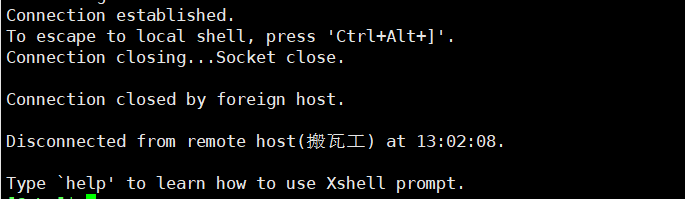
I looked at many solutions online, and one method worked: using a domestic cloud service provider like Alibaba Cloud to connect to the foreign VPS - the speed was much faster than directly using an SSH tool locally (without a proxy).
I tried it myself and set up an intermediate forwarding server through Alibaba Cloud in Termius SSH software. Connecting to the foreign VPS again was very fast.
Out of curiosity, I started researching SSH proxy connections to foreign VPS and even asked people in Telegram groups. I found that my SSH software settings were correct, and others could successfully connect to foreign VPS through SSH proxy with the same settings, but mine didn’t work.
However, when I switched to my self-hosted proxy node, I successfully connected to the foreign VPS. Using commercial proxy service nodes still resulted in the error shown above.
2. Solution
First, make sure the proxy is properly configured in your SSH software.
Change the default SSH port 22 on the foreign VPS to something like 23456.
|
|
Then try using the commercial proxy service node again, and you should be able to successfully connect to the foreign VPS.
3. Root Cause
Most commercial proxy services have auditing in place, which may block the SSH protocol. This prevents you from using the proxy to connect to port 22 on foreign VPS.
Why do most commercial proxy services block the SSH protocol?


Simply put, this port could be abused, and abuse causes trouble for the provider. For example, most cloud service providers block SMTP port 25 to prevent people from sending spam emails.
Why is connecting to a foreign VPS through domestic cloud service providers like Alibaba Cloud faster than using SSH software directly (without a proxy)?

Alibaba Cloud’s routing to your foreign VPS is better optimized than your direct connection to the foreign VPS.
Document Info
- License: Free to share - Non-commercial - No derivatives - Attribution required (CC BY-NC-ND 4.0)