The Execution Process of 'ls > list' Command
Question
|
|
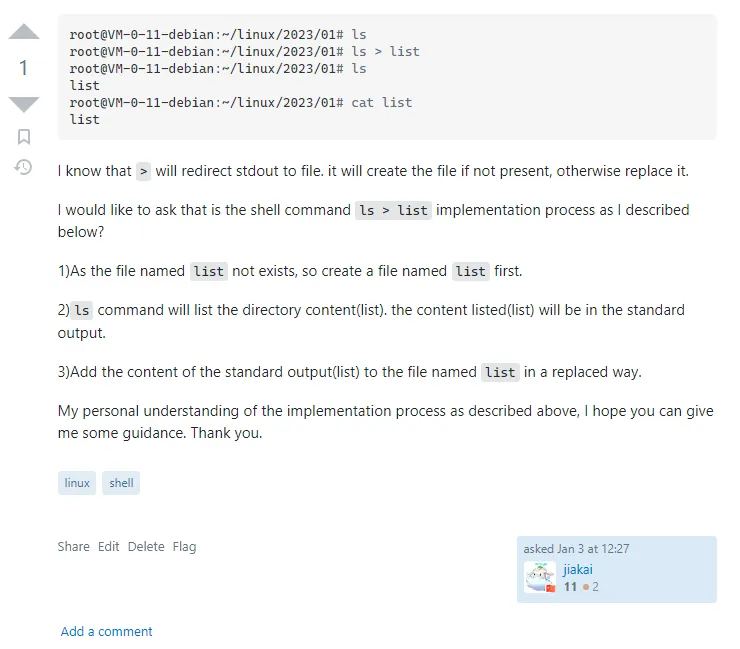
I know the > symbol redirects standard output to a file. If the file doesn’t exist, it creates the file; otherwise, it replaces the file.
I want to ask whether the execution process of the shell command ls > list is as I describe below:
-
Because a file named “list” doesn’t exist, it first creates a file named “list”.
-
The
lscommand lists the contents of the directory (list), and the listed content is sent to standard output. -
In a replacement mode, the content from standard output (list) is added to the file named “list”.
My personal understanding of the execution process is as described above. I hope you can give me some guidance, thank you.
Answer
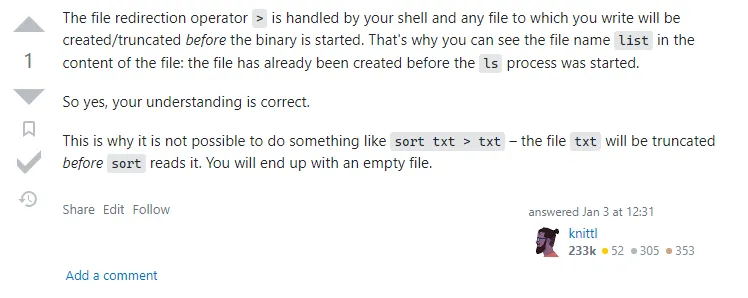
The file redirection operator > is handled by the shell and creates/truncates whatever file you write to before starting the binary (ls). That’s why you can see the filename “list” in the file contents: the file was created before the ls process started.
Yes, your understanding is correct.
This is why it’s not possible to do things like sort txt > txt — before sort reads the file, the file named txt will be truncated. You’ll end up with an empty file. (Note: the sort command is used to sort all lines in a text file)
Summary
The execution process of ls > list:
-
> listcreates a file named “list” -
lscommand lists the directory contents (result is “list”) -
The result “list” is written to the file named “list” in replacement mode.
There’s still a lot worth exploring in shell/Linux commands. Today I saw an article What happens when you open a terminal and enter ’ls’. The article explains what happens when you open a terminal and enter the ls command. After browsing through it, I found many concepts and terms I didn’t understand. Reading this article was somewhat painful for me, but it precisely points out the direction for my future efforts.
Document Info
- License: Free to share - Non-commercial - No derivatives - Attribution required (CC BY-NC-ND 4.0)